
Download Abyss Web Server – Free Windows Web Server Software
Overview
Abyss Web Server is a lightweight, free‑of‑charge web server designed exclusively for Windows platforms. Although it has been around since the early 2000s, the software still attracts a steady stream of users in regions such as the United Kingdom, India, and Brazil, thanks to its small footprint and straightforward configuration process. The current release, version X1, received a targeted update on September 19 2007 that added Vista support, refined the console UI, and introduced a more robust documentation set.
Because it is purpose‑built for Windows 95 and later, developers who need a quick, reliable way to host static sites, test CGI scripts, or experiment with FastCGI can spin up Abyss without allocating large amounts of disk space or memory. Its native Windows installer integrates with the system’s services manager, allowing the server to start automatically on boot if desired. The software also ships with a built‑in URL rewriting engine and optional Ruby on Rails support, which makes it surprisingly flexible for a free tool.
While it does not compete with enterprise‑grade servers like IIS or Apache in terms of scaling to thousands of simultaneous connections, Abyss Web Server offers a perfectly adequate environment for personal projects, small business sites, or educational labs. Security updates are released periodically, and the installer signs the binary with a Microsoft Authenticode certificate, ensuring that the download is trustworthy and free from tampering. Overall, Abyss Web Server remains a solid, no‑cost solution for anyone looking to host a site on a Windows machine without the overhead of a full‑blown server suite.
Key Features
- Lightweight architecture – requires minimal CPU and RAM.
- Native Windows installer with service integration.
- Built‑in URL rewriting engine for clean, SEO‑friendly URLs.
- Support for FastCGI – both standalone and remote modes.
- Ruby on Rails framework compatibility for dynamic applications.
- Comprehensive documentation that covers installation, configuration, and troubleshooting.
- Secure HTTPS support with self‑signed or third‑party certificates.
- Console enhancements, including sortable tables and clearer status codes.
- Automatic updates for Windows Vista and newer OS versions.
- Free of charge with a permissive license for personal and commercial use.
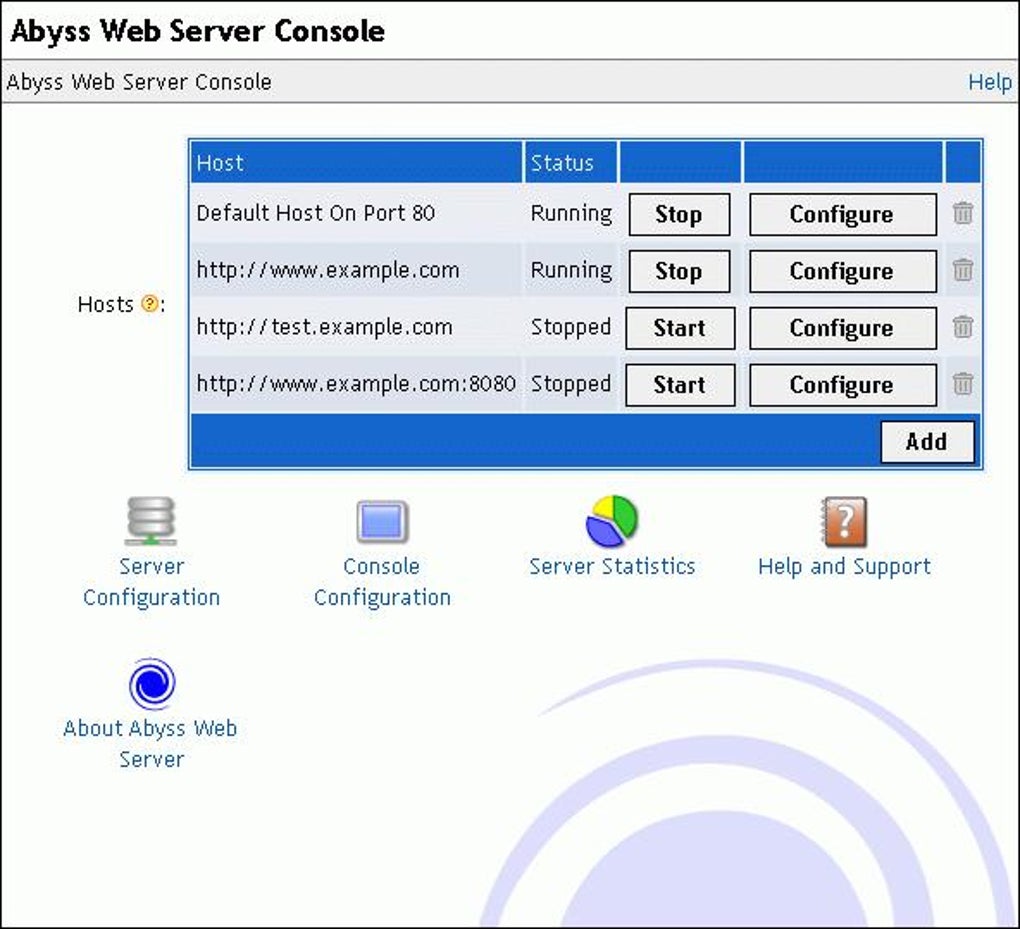
Each of these features has been crafted with the goal of keeping the server simple yet functional. The URL rewriting engine, for example, lets you map complex query strings to clean paths without needing external modules. FastCGI support means you can run PHP, Python, or other language interpreters efficiently, while the Ruby on Rails integration opens the door to modern web frameworks without extra configuration. Security is handled through standard Windows SSL/TLS libraries, allowing you to enable HTTPS with a few clicks in the control panel. The console UI, updated in the latest release, now orders buttons logically and presents status codes in an easily readable format, making day‑to‑day management less intimidating for beginners.
Installation, Usage & Compatibility
Step‑by‑Step Installation
Downloading Abyss Web Server is straightforward: visit the official site, click the “Download for Windows” button, and save the .exe installer. Because the file is digitally signed, Windows will prompt you to verify the publisher; confirming the signature ensures the package is authentic. Run the installer with administrative rights, choose the destination folder (the default C:\Program Files\AbyssWebServer works for most users), and decide whether to install the server as a Windows service.
Selecting the service option lets Abyss start automatically when the computer boots, which is ideal for a production environment. The wizard then asks you to set a default port (80 for HTTP, 443 for HTTPS) and to create an admin password for the web‑based control panel. After the final “Finish” click, the server launches the configuration console where you can add virtual hosts, enable SSL, and adjust logging preferences.
Basic Usage
Once installed, managing Abyss is a matter of using its web console, typically accessed at http://localhost:8080/ (or the port you chose). The dashboard displays real‑time statistics, including active connections, request rates, and error logs. To host a site, create a new virtual host, point the document root to the folder containing your HTML, CSS, or script files, and enable any required modules such as FastCGI.
For developers testing CGI scripts, simply drop the script into the cgi-bin directory and configure the interpreter path in the console. The built‑in URL rewriting tool can be accessed via the “Rewrite Rules” tab, where you add patterns and target URLs using a simple syntax similar to Apache’s mod_rewrite. When you’re ready to go live, you can switch the server from “development” to “production” mode, which tightens security settings and reduces verbose logging.
Compatibility
Abyss Web Server officially supports Windows 95 and all later versions, including Windows XP, Vista, 7, 8, 10, and the newer Windows 11 releases. The Vista‑specific update introduced compatibility with the newer security model and service handling introduced in that OS, ensuring that the server runs without legacy compatibility warnings. While the core engine is Windows‑only, the developers also released a universal binary for macOS that contains both PowerPC and Intel executables, though the primary distribution remains focused on the Windows market. Because the application relies on native Windows networking APIs, it integrates cleanly with firewalls, IPv6, and Windows authentication mechanisms. Users who need to run the server on a virtual machine can do so without any extra configuration, making Abyss a popular choice for local development environments and classroom labs.
Pros, Cons & Frequently Asked Questions
Pros
- Free to download and use for personal or commercial projects.
- Very small installation size – ideal for low‑resource machines.
- Easy to set up via a graphical console; no command‑line expertise required.
- Supports modern web technologies such as FastCGI and URL rewriting.
- Secure HTTPS support with standard Windows certificates.
Cons
- Limited to Windows platforms – no native Linux or Android builds.
- Feature set is smaller than enterprise servers like IIS or Apache.
- Documentation, while comprehensive, can feel dated for newer developers.
- No built‑in database engine; external DBMS required for dynamic sites.
- Community support relies on forums; no official paid support channel.
FAQ
Is Abyss Web Server really free?
Yes, the software is released under a free‑use license that allows both personal and commercial deployment without any licensing fees.
Can I run Abyss on a Windows Server edition?
Absolutely. The installer works on Windows Server 2003, 2008, 2012, and newer versions, and you can configure it as a Windows service for automatic start‑up.
How do I enable HTTPS on Abyss?
Open the web console, navigate to the “SSL Settings” tab, import or generate an SSL certificate, bind it to port 443, and enable the “Require SSL” option for the desired virtual host.
Does Abyss support PHP out of the box?
Abyss does not ship a PHP interpreter, but you can configure FastCGI to point to an external PHP‑CGI binary, allowing you to run PHP scripts seamlessly.
Is there a way to automate deployment with Abyss?
Yes. Abyss provides a command‑line interface (CLI) that can be scripted to add virtual hosts, reload configuration, and restart the service, making it suitable for automated CI/CD pipelines on Windows.
Overall Rating: 4.2/5
Pros: lightweight, free, simple UI, solid FastCGI support.
Cons: Windows‑only, limited advanced features.
Conclusion & Call to Action
If you need a reliable, low‑overhead web server for a Windows machine, Abyss Web Server delivers exactly what the name promises: a straightforward, free solution that gets the job done without demanding extensive system resources or deep networking knowledge. While it won’t replace a full‑scale enterprise server in high‑traffic scenarios, its feature set—URL rewriting, FastCGI, HTTPS, and Ruby on Rails support—covers the majority of small‑to‑medium projects. The easy‑to‑use console, automatic Windows service integration, and regular security updates make it a trustworthy choice for developers, educators, and hobbyists alike. Download Abyss Web Server today, follow the simple installation steps, and have a functional web server up and running within minutes. Your next website, testing environment, or prototype is just a few clicks away.
Download Abyss Web Server now – it’s free, secure, and ready for immediate use.







